When you delegate work to AI, the same questions keep coming up.
“Which version of this data structure are we on?”
“Is this figure confirmed, or still an estimate?”
“What did we decide to do about this last week?”
Each time I opened a new conversation, I pasted this background in again. The longer the paste became, the more I left out, and whatever I left out ended up in the output. I set a rule that estimates must not be stated as facts and stopped including that sentence, and the next draft still came out with a definitive statement.
The problem was not that I wrote prompts poorly. The material the AI was supposed to read was not organized. So, separate from the documents people read, I built a wiki for AI to read.
What Is an LLM Wiki?
It is a set of documents written to give AI the background of a project. It differs from a general wiki in that its reader is not a person. It holds three things: what must be read for a given task, what has been decided so far and how, and what must not be done.
Previously, this content was pasted into the chat window. Someone had to remember and select it each time, and it disappeared when the conversation ended. With a wiki, the AI reads a predefined set of notes first, depending on the type of task, before it starts.
Why Is an LLM Wiki Needed?
There are several ways to give AI background. Pasting requires no preparation, but it disappears when the conversation ends. Including whole documents leaves nothing out, but it mixes in content unrelated to the judgment at hand. Vector search can find material even across many documents, but it cannot match the correspondences of terms used only in our field.
A wiki does not replace these methods. It is the layer that decides what to read, and search runs beneath it.
Documents read by people and documents read by AI also differ in nature. People skim and read only the parts they need, but AI reads everything it is given. People remember past decisions, but AI does not know anything that is not written down. When people don’t know something, they ask; when AI doesn’t know, it fills the gap.
Five Benefits of the Wiki
1. It eliminates the need to re-explain background
Notes to read are grouped by task type. The purpose, required notes, supplementary notes, instructions, and output format all fit on a single page. Separating required notes from supplementary ones means that when the material exceeds the limit, it is already decided what to cut first.
2. Past decisions and their reasons are preserved
The output shows what was decided, but why it was decided survives only in the documents. Decisions, reasons, and scope of impact are accumulated one line at a time; there are 34 so far. There was a case where we decided to include a figure, then reconsidered the required conditions and reversed it to not included. Because the reason was written down, we could reverse the decision cleanly.
3. Work status carries over
Even when returning after a few days, one sentence restores the current status, what has been completed, what is in progress, and the next task. For items that have already been fully investigated, we added a marker saying not to investigate them again, so the same investigation is not repeated.
4. It prevents fabrication
AI fills in values it does not know rather than leaving them blank. Writing this prohibition in the instructions was not reliably followed, so we blocked it structurally. In tables, we separated the columns AI writes from the columns only people write, and required a source for each value. The key is including “not obtained” among the source types. If there is no option to choose, AI will fabricate. Values without a source are used only for relative comparison, and if a required item is empty, the next calculation does not start.
5. Rules can be turned into automated checks
Rules recorded in the wiki are sentences, so someone has to verify whether they were followed. Therefore, we create one check item per rule and run them whenever documents are produced. Examples include whether figures have sources attached, whether unconfirmed items are referenced in the body, and whether the revision number matches the cover.
When publishing a revision, I once forgot to update the revision number on the cover. The revision number was scattered across three places, and only two of them were linked. Now, if any one of the nine check items fails, the document is not generated.
The currently built structure
At present, we operate with 209 notes across 7 top-level folders.
Once notes exceed 200, a folder tree no longer shows the connections. To see which notes attract many links and which are not connected to anything, we also review them as a graph.
Initially, we divided them by topic: data, planning, research, meeting minutes. That is natural for people but useless for AI. From the name “meeting minutes” alone, one cannot tell whether that folder should be read or whether anything should be written into it.
Inputs and criteria are not kept in the same folder. Materials synced in from outside and the criteria used to check them serve different purposes. Grouping both as “business materials” loses the distinction between what is checked against what.
Adding Workflows to the Wiki
The wiki is material; a workflow is procedure. They are different things, and the workflow reads the wiki.
With only a wiki, the material is in place but there is no sequence. A person would have to tell the AI each time what to read and what to do. So we divided the work into six stages and defined each stage in a single note. We did not use a framework. Keeping the stages in notes means no deployment is needed when a rule changes, and the change history is preserved as is.
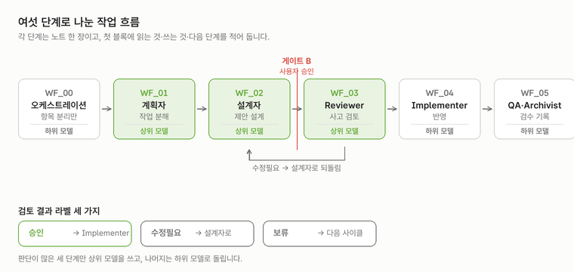
Every stage note opens with a block describing what to read, what to write, and the next stage. Specifying what not to do mattered more than specifying what to read. The first stage only separates items, so it does no prioritization or risk analysis. When this was not stated, the first stage handled planning, design, and review all on its own.
Review results use only three labels: approved, needs revision, and on hold. Initially there were seven, but distinguishing between the labels took time, and the next action was still not defined. Reducing them to three made each label serve directly as the next stage.
Two Improvements from Adding Workflows
1. Token usage went down
The amount read differs by stage. The stage that only separates items needs just one note, while the design stage consults several. Since the entire wiki is not read every time, the same work is processed with less material.
The bigger difference is the model. Planning, design, and review involve comparing alternatives and deciding whether to reject, so they use a higher-tier model. Orchestration, on the other hand, only splits work notes into items, and recording reflection and verification is copying what the previous stage already decided. These three stages produced the same results even when run on lower-tier models.
The reason the models can be swapped is the contract written for each stage. What each stage receives and what it must output are fixed, so even when the model changes, the format the next stage receives does not waver.
2. Work proceeds with both knowledge and status in hand
Each stage reads both the wiki and a status note. From the wiki it takes what is known; from the status note it takes how far things have progressed. Even without anyone pasting anything, it starts with both already loaded.
The effect of this combination is that “we decided this last time, right?” and “where is that material?” both disappeared.
Examples of actual operation
Example 1. Summarizing today’s work
If you only type “Summarize today’s work,” it reads the work notes, separates the items, goes through planning and design, and produces a review report. It does not re-explain the project background or past decisions.
Example 2. When the data structure changes
If the summary note stays the same while the source changes, the AI answers based on items that no longer exist. So when a task touches that material, it reads the reference date in the summary note and asks the user whether a new version exists. It does not update automatically because the source sits outside the system, so it cannot know whether a new version has appeared.
Current limitations
This structure does not maintain itself. When notes are moved, links break without any error, and the notes are simply skipped without being read. In fact, there was a time when a folder was moved but the folder map in the bootstrap document still pointed to the old path.
Synchronization with external tools such as Notion is still manual. The checker can only catch format problems; whether the meaning of a figure is correct still has to be read by a person.
Directions for future expansion
1. Connecting internal wiki search
As the notes grow further, we will add search on top of the current note collection. The folders to index will follow the current structure as is.
2. Automating synchronization with external tools
Work logs accumulating in Notion will be imported automatically. Right now, a person transfers them by hand.
3. Automatic execution of check items
Currently they run only when documents are produced. We will set them to run automatically when changes are pushed to the repository.
4. Team-level expansion
Currently it is built for individual use. For several people to use it, the reading order and approval points must be redefined as shared rules.
What this wiki means for ByOrbit work
ByOrbit handles raw materials and byproducts, processes, and distribution data. In areas where every figure needs a standard and a source, the greatest risk is unsupported values mixing into plausible-sounding sentences. By writing into files, rather than into conversation, what to read, how far to judge, and which values to leave blank, the wiki reduces that risk.
It also pulls scattered materials together in one place. Raw material composition, process conditions, and past decisions are organized as notes, so only what the work requires needs to be checked. Progress is recorded as well, so there is nothing to explain again.
In practice, the benefits are speed and cost. By setting the amount to read for each stage and using the higher-tier model only in the sections that require judgment, the same work is finished with fewer tokens.
Conclusion
In short, what the wiki does is simple. It predetermines the material AI reads, records past decisions and work status, and blocks what must not be done through documentation. Adding a workflow means each stage reads only as much as it needs, and the model suited to each stage can be chosen.
The trade-off is that more time goes into writing and maintaining documents. If a project is short, this is a loss; if it is long, I think this approach is the better one.